PostgreSQL 14 Is End-of-Life: How to Upgrade Safely
By CodingDidi · Nov 20, 2026 · 7 min read
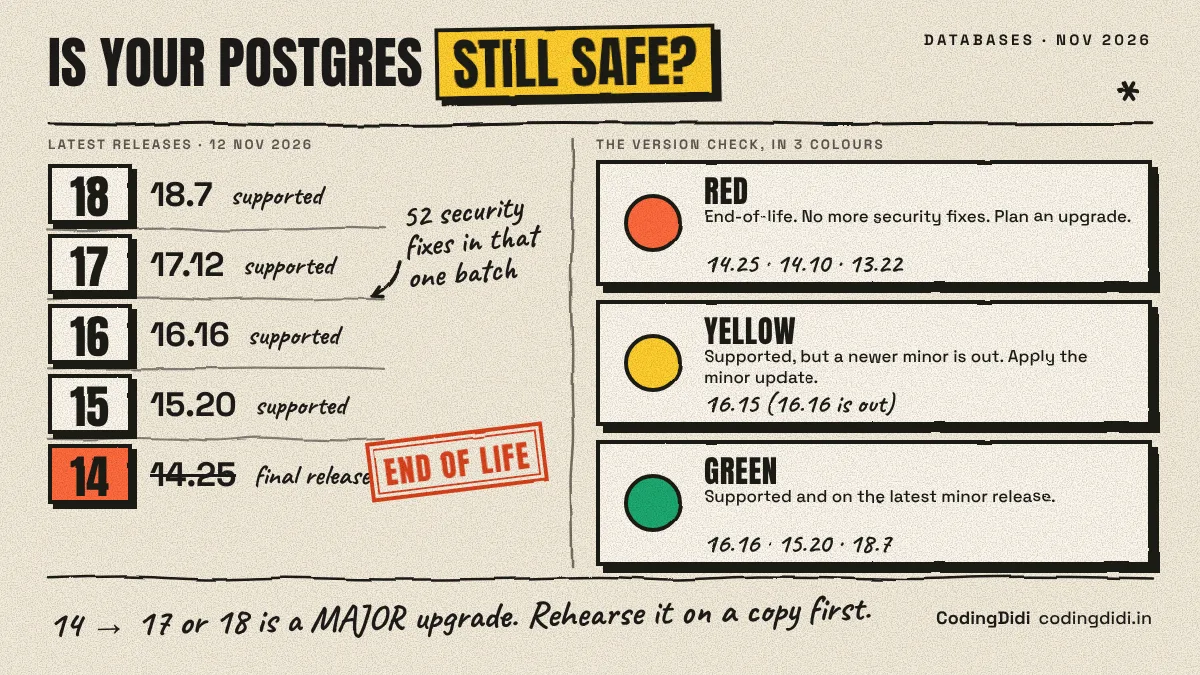
On November 12, 2026, the PostgreSQL project shipped its last-ever update for version 14 and said it is now end-of-life. The same release fixed 52 security problems across all supported versions. If your app, side project, or client site runs PostgreSQL 14, nothing breaks today, but future security holes will never be patched. This guide gives you a 10-minute version check (Python script, tested), a safe upgrade plan, and a list of what to test before you switch.
What happened on November 12
PostgreSQL publishes updates on a fixed schedule. The November 12 batch was big. According to the project's announcement as quoted by Rescana, versions 18.7, 17.12, 16.16, 15.20 and 14.25 shipped that day, and the update "fixes 52 security vulnerabilities and over 140 bugs." The project also says this is the final release of PostgreSQL 14 and that version 14 is now end-of-life.
That last part is not a surprise. The PostgreSQL site had warned for months that 14 would stop receiving fixes, and the project's lifecycle is predictable: each major version gets five years of support, then one final minor release, then nothing.
What makes this month different is the size of the final batch.
Why this batch is worth taking seriously
I'm not a security researcher, so here is what the reporting says, with attribution:
Read those carefully. Most of these bugs require someone to already hold a database login. That is not nothing, though. A leaked connection string, a shared staging password, or a vulnerable web app that lets attackers run SQL can turn "needs a login" into "needs a mistake".
The practical point: on PostgreSQL 14, 14.25 closes these holes and nothing after it will. Every future bug in that code stays open.
Step 1: Find out what you actually run (tested script)
Many people don't know their exact database version, especially on a hosting dashboard they set up two years ago. This read-only Python script checks it. It uses the psycopg package (pip install "psycopg[binary]").
import sys, psycopg

# Source: postgresql.org release announcement, 12 Nov 2026. Update after each release.
LATEST_MINOR = {18: 7, 17: 12, 16: 16, 15: 20, 14: 25}
END_OF_LIFE = {14}   # majors the project calls end-of-life as of 12 Nov 2026

def check(dsn):
    with psycopg.connect(dsn) as conn, conn.cursor() as cur:
        cur.execute("SHOW server_version_num")
        num = int(cur.fetchone()[0])            # e.g. 160015
        major, minor = num // 10000, num % 10000
        cur.execute("SELECT extname, extversion FROM pg_extension ORDER BY 1")
        exts = cur.fetchall()

    print(f"Server: PostgreSQL {major}.{minor}")
    if major in END_OF_LIFE or major < min(LATEST_MINOR):
        print("  RED   : end-of-life, no more security fixes. Plan an upgrade.")
    elif major not in LATEST_MINOR:
        print("  YELLOW: major version not in my table; check postgresql.org/support/versioning")
    elif minor < LATEST_MINOR[major]:
        print(f"  YELLOW: supported, but {major}.{LATEST_MINOR[major]} is out. Apply the minor update.")
    else:
        print("  GREEN : supported and on the latest minor in my table.")
    print("Extensions (rebuild/verify each after an upgrade):")
    for name, ver in exts:
        print(f"  {name} {ver}")

if __name__ == "__main__":
    check(sys.argv[1])
Run it like python pg_health.py "host=localhost dbname=mydb user=me".
I tested it against a scratch PostgreSQL 16 server on my machine. Real output:
Server: PostgreSQL 16.15
  YELLOW: supported, but 16.16 is out. Apply the minor update.
Extensions (rebuild/verify each after an upgrade):
  pg_stat_statements 1.10
  plpgsql 1.0
My own test server was one minor release behind. That is a good reminder that this problem is not just for people on old versions.
I also fed it made-up version numbers to check the logic. 14.25 and 14.10 came out RED, 13.22 RED, 16.15 YELLOW, and 15.20, 16.16 and 18.7 GREEN. The table of latest minors only knows the five versions in the announcement, so update it each time a new release comes out.
Two honest limits: the script reads the version number you report, and it can't tell you whether your cloud provider has patched behind the scenes. If you use a managed database, check your provider's status page and their own maintenance notes.
Step 2: Understand minor vs. major upgrades
This trips up beginners, so here it is in plain words.
- Minor update (16.15 to 16.16): same data format. You install the new software, restart, done. Low risk. Always do these.
- Major upgrade (14 to 17 or 18): the storage format changes, so you need a proper upgrade process. This is what 14 users now face.
Note that you cannot fix an end-of-life version by applying "the latest 14.x". 14.25 is the end of the line.
Step 3: Pick a target version
Your realistic options today are the supported versions in the announcement: 15, 16, 17 and 18.
I'm giving a general rule here, not a recommendation for your specific system. Your provider's supported versions and your extensions may decide this for you.
Step 4: Rehearse the upgrade on a copy
Never run your first major upgrade on production. The safe pattern:
- Take a backup and restore it to a scratch server. This also proves your backups work.
- Run the upgrade there. The two common methods are
pg_upgrade, which converts the data in place and is usually faster, and dump and restore with pg_dump / pg_restore, which is simpler and slower. The PostgreSQL project's own beta notes describe pg_upgrade or pg_dump/pg_restore as the strategies for moving between major versions.
- Point a copy of your app at it and run your tests.
- Time the whole thing. That number tells you how long your maintenance window must be.
pg_upgrade has a built-in dry run. I tested it on two scratch clusters of the same version, which is not a real 14-to-18 upgrade but does show what the checks look like:
Checking database connection settings                         ok
Checking for prepared transactions                            ok
Checking for system-defined composite types in user tables    ok
Checking for reg* data types in user tables                   ok
Checking for contrib/isn with bigint-passing mismatch         ok
Checking for not-null constraint inconsistencies              ok
Checking for presence of required libraries                   ok
Checking database user is the install user                    ok
Checking for new cluster tablespace directories               ok

*Clusters are compatible*
The command was pg_upgrade --check with the old and new binary and data directories passed in. It changes nothing; it only reports problems. On a real 14 cluster you may see failures, such as a missing extension library for the new version. Those are exactly the surprises you want on a Tuesday afternoon, not during the real cutover.
Step 5: Check extensions and drivers
Extensions are where upgrades quietly go wrong. My script lists them for a reason.
One detail from the November release: according to Corgea's write-up, CVE-2026-6460 involves an ABI change, so extensions built from PostgreSQL headers need rebuilding against the new minors (18.7, 17.12, 16.16, 15.20, 14.25). If you compile extensions yourself, rebuild them after patching. If you install them from your operating system's packages, your package manager normally handles it, but verify.
On the Python side, you usually don't need code changes for a major upgrade, but test:
- Your driver (
psycopg, asyncpg, psycopg2) connecting with your real authentication method.
- Your ORM migrations from a clean database.
- Slow queries. Query plans can change between major versions, so compare timings on your important queries before and after.
- Your backup and restore job. Restore the new backup somewhere and confirm it opens.
A simple upgrade checklist
- [ ] Run the version script on every environment (production, staging, local)
- [ ] Apply the latest minor update to anything on 15, 16, 17 or 18
- [ ] Choose a target major version and confirm your host supports it
- [ ] Restore a backup to a scratch server and time it
- [ ] Run
pg_upgrade --check (or a trial dump and restore)
- [ ] List extensions and confirm each exists for the target version
- [ ] Run your test suite and your five slowest queries on the copy
- [ ] Write a rollback plan: keep the old server and a fresh backup until you are sure
- [ ] Schedule the window, upgrade, and run the version script again
If you are tracking this kind of multi-step work alongside learning, the CodingDidi trackers are a handy place to keep your plan. And if you'd like a second pair of eyes on your upgrade plan, you can book a 1:1 session.
New to SQL itself? Start with our free SQL practice sites and the window function examples before you touch a production database.
What I did not test
To be clear about the limits of this post:
- I ran the Python script and
pg_upgrade --check on a scratch PostgreSQL 16 server, not on 14 or 18.
- I did not perform a real 14-to-18 upgrade. The steps follow standard PostgreSQL practice and the sources linked above.
- I did not verify the CVE details myself. They come from the reports I cited, and they may be updated. Always read the official release notes.
Frequently asked questions
Is PostgreSQL 14 safe to keep using?
It still runs, but it no longer receives security or bug fixes. The project's notice says 14 is end-of-life and will not get further fixes. The November 12 batch fixed 52 problems across supported versions, and every new one found in 14's code from now on will stay unpatched. Plan an upgrade.
What is the difference between a minor and a major PostgreSQL upgrade?
A minor update (like 16.15 to 16.16) swaps the software and keeps the same data format, so it is quick and low risk. A major upgrade (like 14 to 17) changes the storage format and needs pg_upgrade or a dump and restore. Minor updates should be applied regularly.
Which PostgreSQL version should I upgrade to?
Choose the newest supported version your host and extensions allow and that you have tested, which means 15, 16, 17 or 18 as of this release. PostgreSQL 19 was still at release-candidate stage in the sources I checked, so wait for its final release before using it in production.
Will upgrading break my Python app?
Usually not, but test it. Check your driver, your migrations and your slowest queries on a copy of the database. Query plans can change between major versions, so compare timings.
What if I use a managed database like RDS or Supabase?
Your provider handles the server software, but major upgrades often still need your approval or a scheduled window. Check your provider's dashboard and announcements for their version support dates, because I could not verify any provider's timeline.