10 SQL Window Function Examples Explained Simply
By CodingDidi · Nov 4, 2026 · 10 min read
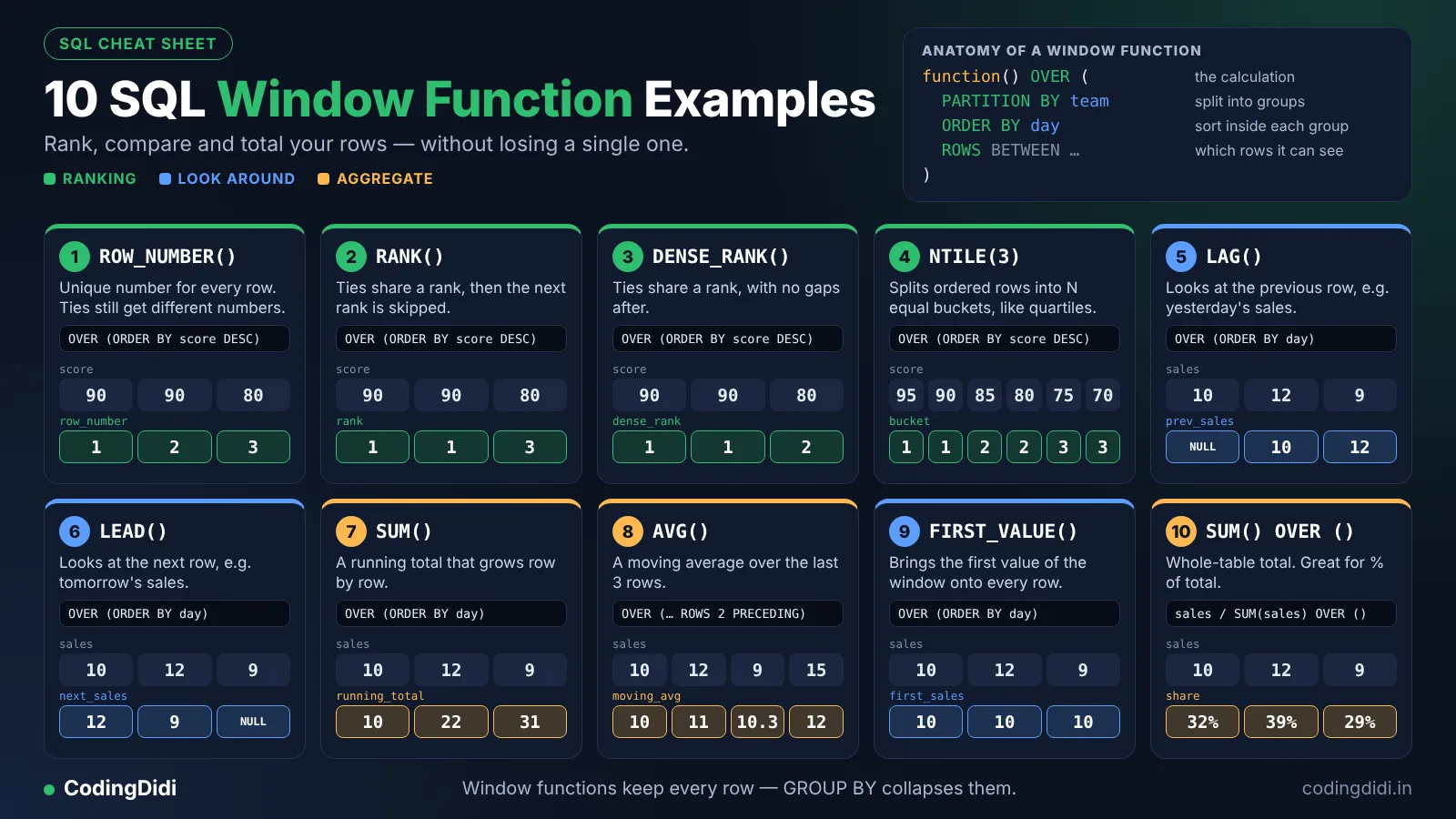
SQL window functions calculate something across a set of related rows without collapsing them into one row, the way GROUP BY does. You write the function, then an OVER (...) clause that says which rows to look at and in what order. The ten examples below cover ranking (ROWNUMBER, RANK, DENSERANK), running totals, moving averages, comparing rows (LAG, LEAD), splitting into buckets (NTILE), FIRST_VALUE and percent of total. Every query was run on one small sample table, and the real results are shown.
If GROUP BY has ever left you thinking "I just want the total next to each row, not instead of them", window functions are the answer. They're also a favorite in analyst interviews, so they repay the time you spend on them.
This guide skips the theory-heavy tour. You'll get one table, ten queries, the output of each, and a plain-English explanation of what's happening.
What Are SQL Window Functions?
A window function performs a calculation over a "window" of rows that relate to the current row, and returns a value for every row. Ordinary aggregates such as SUM() with GROUP BY squash many rows into one. A window function keeps all your rows and adds a new column.
Every window function has the same shape:
function_name(...) OVER (
  PARTITION BY column   -- optional: split rows into groups
  ORDER BY column       -- optional: order rows inside each group
  ROWS BETWEEN ...      -- optional: which rows count as the window
)
PARTITION BY splits the data into groups. Think of it as GROUP BY that doesn't merge rows. Leave it out and the whole table is one group.ORDER BY sets the order inside each group, which matters for ranking, running totals and LAG/LEAD.- The frame (
ROWS BETWEEN ...) narrows which nearby rows are included, such as "this row and the two before it".
The Sample Table Used in Every Example
All ten examples use one table called sales:
| id |
rep |
region |
sale_date |
amount |
| 1 |
Asha |
East |
2026-01-05 |
500 |
| 2 |
Ben |
East |
2026-01-12 |
700 |
| 3 |
Cara |
West |
2026-01-15 |
700 |
| 4 |
Dev |
West |
2026-02-02 |
300 |
| 5 |
Asha |
East |
2026-02-10 |
900 |
| 6 |
Ben |
East |
2026-02-20 |
500 |
| 7 |
Cara |
West |
2026-03-03 |
1000 |
| 8 |
Dev |
West |
2026-03-14 |
300 |
You can paste this into any SQL practice tool that supports window functions, such as SQLite 3.25 or newer, PostgreSQL, MySQL 8 or SQL Server.
10 SQL Window Function Examples
1. ROW_NUMBER(): Number the Rows Inside Each Group
ROW_NUMBER() gives every row a unique number, starting at 1 within each partition.
SELECT rep, region, amount,
       ROW_NUMBER() OVER (
         PARTITION BY region ORDER BY amount DESC
       ) AS rn
FROM sales;
Result for the East region: Asha 900 → 1, Ben 700 → 2, Asha 500 → 3, Ben 500 → 4. West starts again at 1 with Cara's 1000.
Why it matters: this is the standard tool for "top N per group". Put the query in a CTE and filter on the number:
WITH ranked AS (
  SELECT rep, region, amount,
         ROW_NUMBER() OVER (PARTITION BY region ORDER BY amount DESC, id) AS rn
  FROM sales
)
SELECT region, rep, amount
FROM ranked
WHERE rn <= 2;
That returns the two biggest sales in each region. Note that you cannot put a window function straight into WHERE, which is why the CTE is needed.
2. RANK(): Rank With Ties and Gaps
RANK() gives tied rows the same rank and then skips the next numbers.
SELECT rep, amount,
       RANK() OVER (ORDER BY amount DESC) AS rnk
FROM sales;
Amounts of 1000, 900, 700, 700, 500, 500, 300, 300 get ranks 1, 2, 3, 3, 5, 5, 7, 7. Two people tied for third, so nobody is fourth.
3. DENSE_RANK(): Rank With Ties and No Gaps
DENSE_RANK() also gives ties the same rank, but never skips numbers.
SELECT rep, amount,
       DENSE_RANK() OVER (ORDER BY amount DESC) AS d
FROM sales;
The same amounts now get 1, 2, 3, 3, 4, 4, 5, 5.
Which one should you use? If a question says "the third highest salary", DENSE_RANK usually matches what people mean. Use RANK when gaps are meaningful (like a race result), and ROW_NUMBER when you need exactly one row per position.
4. Running Total With SUM() OVER
Add ORDER BY inside OVER and SUM() becomes a cumulative total.
SELECT sale_date, amount,
       SUM(amount) OVER (ORDER BY sale_date) AS running_total
FROM sales;
The running total climbs 500, 1200, 1900, 2200, 3100, 3600, 4600, 4900. Add PARTITION BY region to restart the total for each region.
Watch out: if two rows share the same date, the default frame treats them as peers and adds them together at once. For strict row-by-row totals, add a unique tie-breaker such as id to the ORDER BY.
5. Moving Average With a Frame
A frame clause limits the window to nearby rows. This one averages the current sale and the two before it.
SELECT sale_date, amount,
       ROUND(AVG(amount) OVER (
         ORDER BY sale_date
         ROWS BETWEEN 2 PRECEDING AND CURRENT ROW
       ), 1) AS avg_3_sales
FROM sales;
The first row averages only itself (500.0), the second averages two rows (600.0), and from the third row on it averages three (633.3, 566.7, and so on).
Why it matters: moving averages smooth out noisy daily or weekly numbers, which is a common request in reporting.
6. LAG(): Compare With the Previous Row
LAG() pulls a value from an earlier row, so you can calculate change without a self-join.
SELECT sale_date, amount,
       LAG(amount) OVER (ORDER BY sale_date) AS previous_amount,
       amount - LAG(amount) OVER (ORDER BY sale_date) AS change
FROM sales;
The first row has NULL for the previous amount because nothing comes before it. The next rows show changes of +200, 0, -400, +600 and so on.
Tip: LAG(amount, 1, 0) lets you set a default value instead of NULL.
7. LEAD(): Look at the Next Row
LEAD() is the mirror image of LAG(). It reads from the following row.
SELECT rep, sale_date,
       LEAD(sale_date) OVER (
         PARTITION BY rep ORDER BY sale_date
       ) AS next_sale
FROM sales;
For Asha, the first row shows 2026-02-10 as her next sale, and her last row shows NULL. Subtract the dates (using your database's date function) to find the gap between a rep's sales.
8. NTILE(): Split Rows Into Equal Buckets
NTILE(n) divides the ordered rows into n groups of roughly equal size.
SELECT rep, amount,
       NTILE(4) OVER (ORDER BY amount DESC, id) AS quartile
FROM sales;
With eight rows and four buckets, each quartile gets two rows. The two largest sales land in quartile 1 and the two smallest in quartile 4.
Use it for: sorting customers into top 25%, middle and bottom groups, or building simple segments.
9. FIRST_VALUE(): Bring the Top Value to Every Row
FIRST_VALUE() returns the first value in the window's order, so you can show "who is the leader" on every row.
SELECT region, rep, amount,
       FIRST_VALUE(rep) OVER (
         PARTITION BY region ORDER BY amount DESC, id
       ) AS top_rep
FROM sales;
Every East row shows Asha and every West row shows Cara, since those reps own the largest sale in their region.
A known trap: LAST_VALUE() often surprises people. With an ORDER BY, the default frame ends at the current row, so LAST_VALUE returns the current row's own value. To get the true last value, add ROWS BETWEEN UNBOUNDED PRECEDING AND UNBOUNDED FOLLOWING.
10. Percent of Total With SUM() OVER (PARTITION BY)
Leave out ORDER BY and SUM() returns the total for the whole partition on every row. Divide to get each row's share.
SELECT region, rep, amount,
       ROUND(100.0 * amount / SUM(amount) OVER (PARTITION BY region), 1)
         AS pct_of_region
FROM sales;
The East total is 2,600, so Asha's 900 sale is 34.6% of her region. In the West, Cara's 1,000 sale is 43.5% of 2,300.
Why it matters: "share of total" is one of the most common metrics in business reporting, and this is the cleanest way to calculate it.
Window Function vs GROUP BY: Which to Use?
| Question |
Use |
| "What is the total sales per region?" (one row per region) |
GROUP BY |
| "Show each sale with its region's total next to it" |
Window function |
| "Rank reps within each region" |
Window function |
| "Count orders per customer" |
GROUP BY |
If you need the detail rows and a summary figure together, reach for a window function.
Common Mistakes With SQL Window Functions
Putting them in WHERE. Window functions are calculated after WHERE and GROUP BY, so you can't filter on them directly. Wrap the query in a CTE or subquery and filter outside.
Forgetting ORDER BY for ranking or LAG. Without an order, "previous row" and "rank" have no meaning, and results may come back in an unpredictable order.
Using ROW_NUMBER() when ties matter. It will break ties arbitrarily unless you add a tie-breaker column. Choose RANK or DENSE_RANK when equal values should share a position.
Mixing up PARTITION BY and GROUP BY. PARTITION BY never reduces your row count. If your output has fewer rows than expected, you've probably written GROUP BY.
Assuming every database behaves identically. Core functions work in PostgreSQL, MySQL 8+, SQL Server and SQLite 3.25+, but extras and date arithmetic differ. Check your engine's documentation.
Frequently Asked Questions
1. What are SQL window functions?
SQL window functions perform a calculation across a set of related rows and return a value for each row without collapsing them. They use an OVER clause with optional PARTITION BY, ORDER BY and frame settings to define the window.
2. What is the difference between RANK and DENSE_RANK?
RANK gives tied rows the same rank and then skips numbers, so ties for third are followed by fifth. DENSE_RANK also gives ties the same rank but never skips, so ties for third are followed by fourth.
3. What is the difference between GROUP BY and PARTITION BY?
GROUP BY combines rows into one row per group. PARTITION BY divides rows into groups for a window function but keeps every original row, so you can show detail and group-level results together.
4. Can you use a window function in a WHERE clause?
No. Window functions run after the WHERE clause, so you can't filter on them directly. Put the window function in a CTE or subquery, then filter on its result in the outer query.
5. Which databases support SQL window functions?
PostgreSQL, MySQL 8.0 and later, SQL Server, Oracle and SQLite 3.25 and later all support window functions. Syntax for the core functions is very similar across them.
Next Steps
Re-type each of the ten queries from memory, then change one thing in each (a different partition, a different order) and predict the output before you run it. That prediction habit is what turns copied syntax into real understanding.
For more practice, work through the sites in our list of free websites to practice SQL online, and keep a daily routine going with the free trackers on CodingDidi.